
Season series: standings across many events
Quick answer
Click Seasons in the top bar, then New series. Name it (for example 2026 Summer League), choose a Points method, and click Create series. Open the series and use Add a tournament to this series to attach each event. Standings update as results come in.
On this page
Overview
A season series ties several events together into one standings table. It's made for weekly leagues, a summer tour, or a multi-event charity cup. You choose how points work, mark events as played, rained out or cancelled, assign substitutes, and share a public standings page or a TV wallboard.
Who this is for
Organizers running leagues or more than one event a season. Series is included on some plans; if you don't see it, email [email protected].
Create a series
Open Seasons
Click Seasons in the top bar. You'll see Season Series.
Click New series
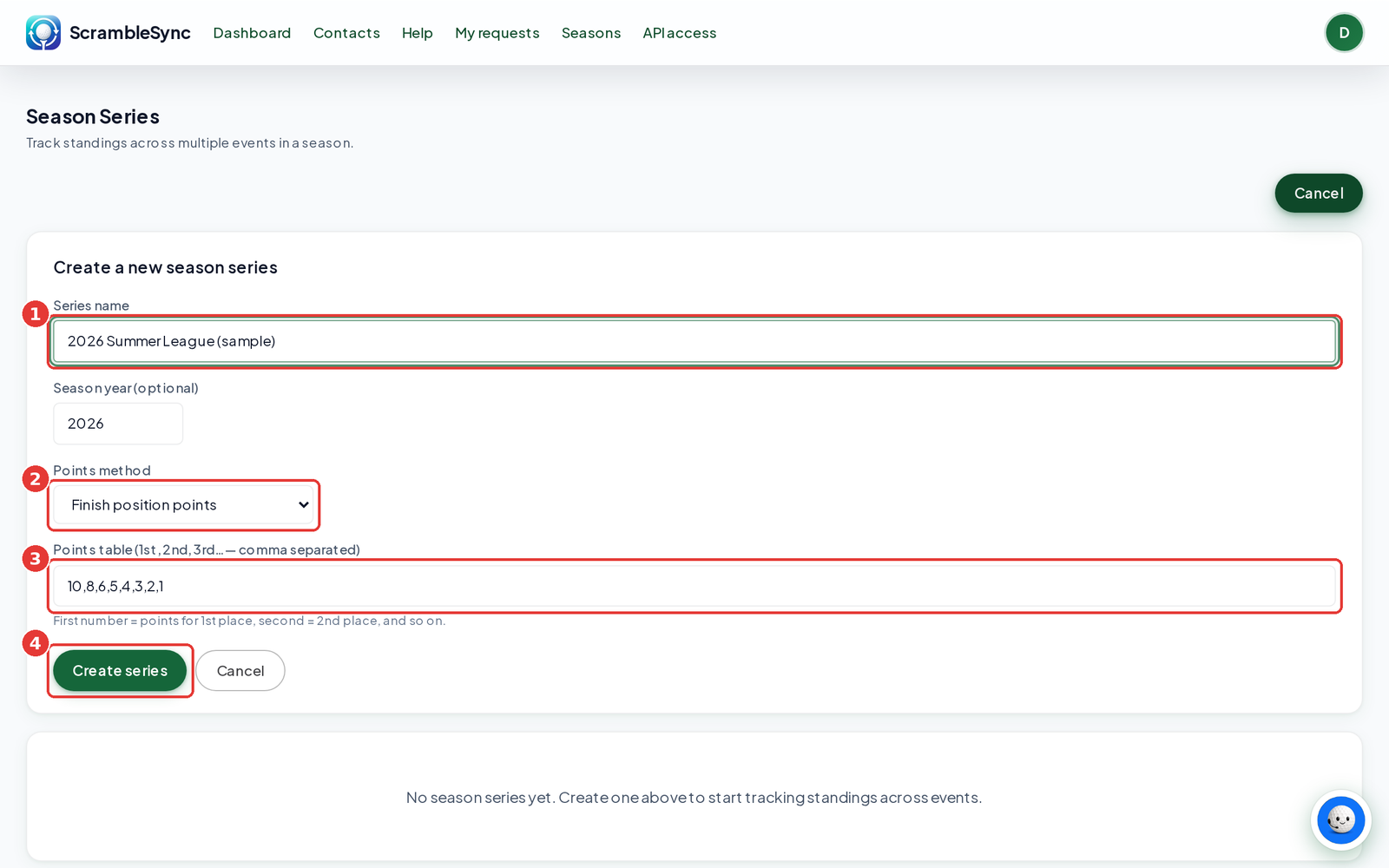
Under Create a new season series, type a Series name (for example 2026 Summer League). Season year (optional) is filled in with this year.
Choose the Points method
Finish position points gives points by finish. Type the Points table, comma separated, for example 10,8,6,5,4,3,2,1. Lowest total score ranks by combined score. Best N events (finish position) uses the points table but only counts each player's best N events, which you set in Count best N events per player.
Click Create series
You'll see 'Season series created.'
Add events and manage the season
Open the series
Click its name in the list.
Add each event
Under Add a tournament to this series, pick the event, set its Weight (1 is normal, 2 counts double), and click Add. Repeat for each event. Weight only changes the points methods. It has no effect with Lowest total score.
Set each event's status
Mark events Scheduled, Played, Rained out, or Cancelled. Cancelled events are left out of the standings.
Assign a substitute if needed
Under Assign a substitute, choose the event, the team the sub plays for, and type the sub's name.
Share
Use Copy public standings link for golfers and Copy wallboard link for a TV at the clubhouse.
Series settings
- Edit settings lets you change the name, points method, points table, and best N count.
- Best N events is handy when not everyone can make every night.
- Weight lets one event count more in the points methods, for example a season finale. With Lowest total score it makes no difference.
- Head-to-head view shows records by opponent: Record (W-L-T), Meetings, and averages.
Tips
- Use the same course and format for every league night so totals compare fairly.
- Duplicate last week's event from its Overview tab to set up the next night in seconds.
- Mark rained out nights so they're clearly separate from cancelled ones.
Troubleshooting
| If you see this | Try this |
|---|---|
| I don't see Seasons in the top bar | Series isn't on your plan yet. Email [email protected]. |
| 'Series name is required' | Type a name before clicking Create series. |
| An event isn't in the list to add | It may already be in this series, or it belongs to another organization. |
Frequently asked questions
Can an event be in more than one series?
Add it to each series you want. Each series keeps its own standings.
What happens to a cancelled night?
Mark it Cancelled and it's left out of the standings.
Can golfers see the standings?
Yes. Share the public standings link or show the wallboard on a TV.