
Event insights: see how your event went
Quick answer
Open your event and click Insights (under More). You'll see turnout (paid registrations, revenue, check-ins), participation (teams that scored and how much of the card was filled in), scoring (average score to par and the hardest and easiest holes), fundraising if you took donations, and engagement (photos, messages, side-game entries).
On this page
Overview
Insights is a one-page, private summary of your event. It's only visible to your team, and it's handy for a board report, a sponsor thank-you, or planning next year.
Who this is for
Organizers and staff after (or during) the event.
Open Insights
Open your event
From your dashboard, click the event.
Click Insights
It's in the sidebar under More.
Read each card
The cards are Turnout, Participation, Scoring, Fundraising (only when you have donations) and Engagement.
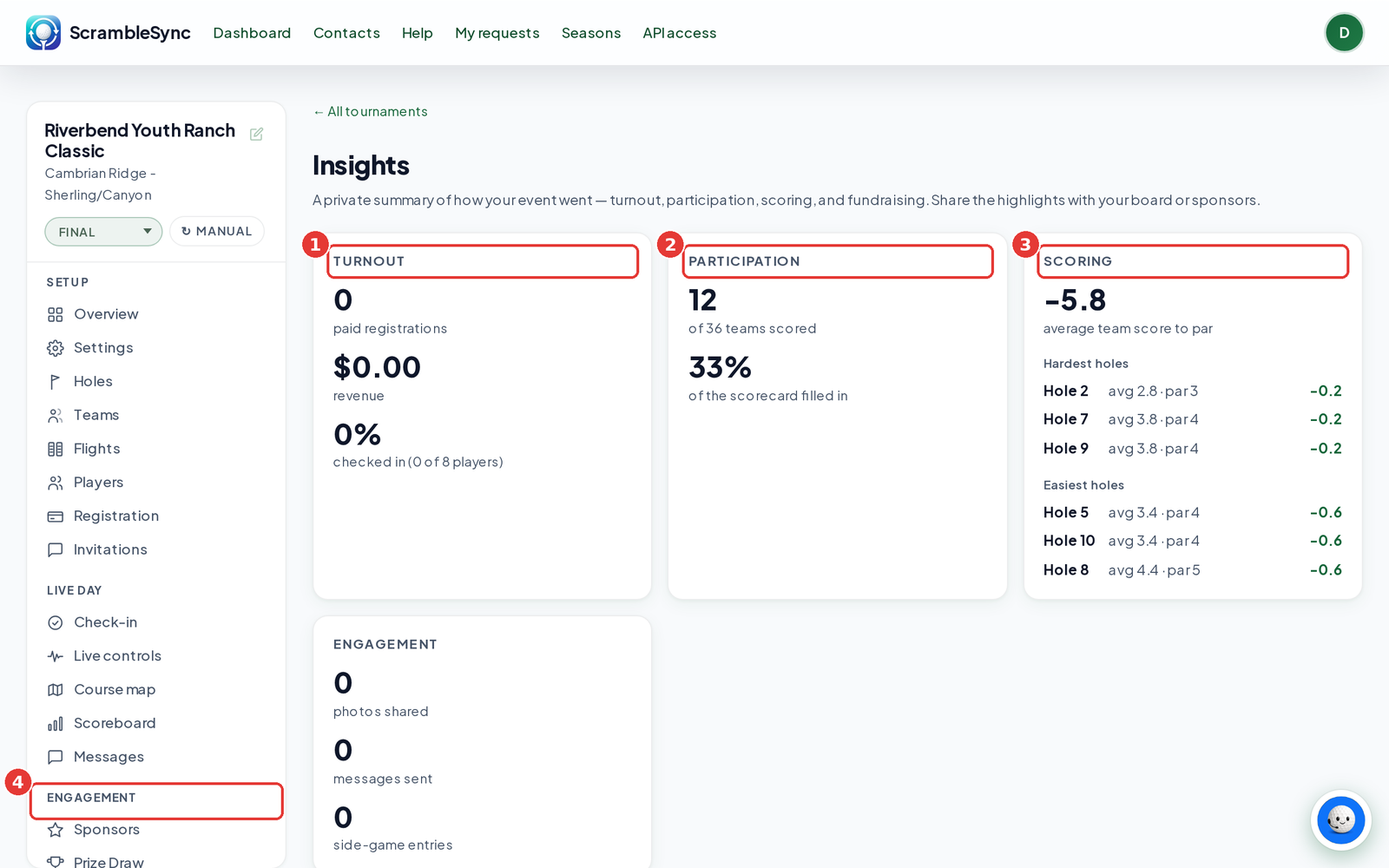
What each card shows
| Card | What it shows |
|---|---|
| Turnout | Paid registrations, revenue, and how many players were checked in. |
| Participation | How many teams scored and how much of the scorecard was filled in. |
| Scoring | Average team score to par, plus the three hardest and three easiest holes by average score. |
| Fundraising | Money raised, number of donations, and top donors. Only shows when the event has donations. |
| Engagement | Photos shared, messages sent, and side-game entries. |
Tips
- Pair Insights with the public recap page when you thank sponsors: Insights for the numbers, the recap for the photos and winners.
- Use the hardest holes list to pick next year's closest to the pin or longest drive holes.
- For full data, use the export buttons on the Overview tab.
Troubleshooting
| If you see this | Try this |
|---|---|
| Numbers look low during the event | Insights counts what has happened so far. Check again after the round. |
| No Fundraising card | It only appears when the event has donations. |
Frequently asked questions
Can golfers or sponsors see Insights?
No. It's private to your team. Share a screenshot if you want to.
Can I download Insights?
Not as a file. Use the exports on the Overview tab for the raw data.