
Scoring formats: scramble, best-ball, Stableford, gross and net
Quick answer
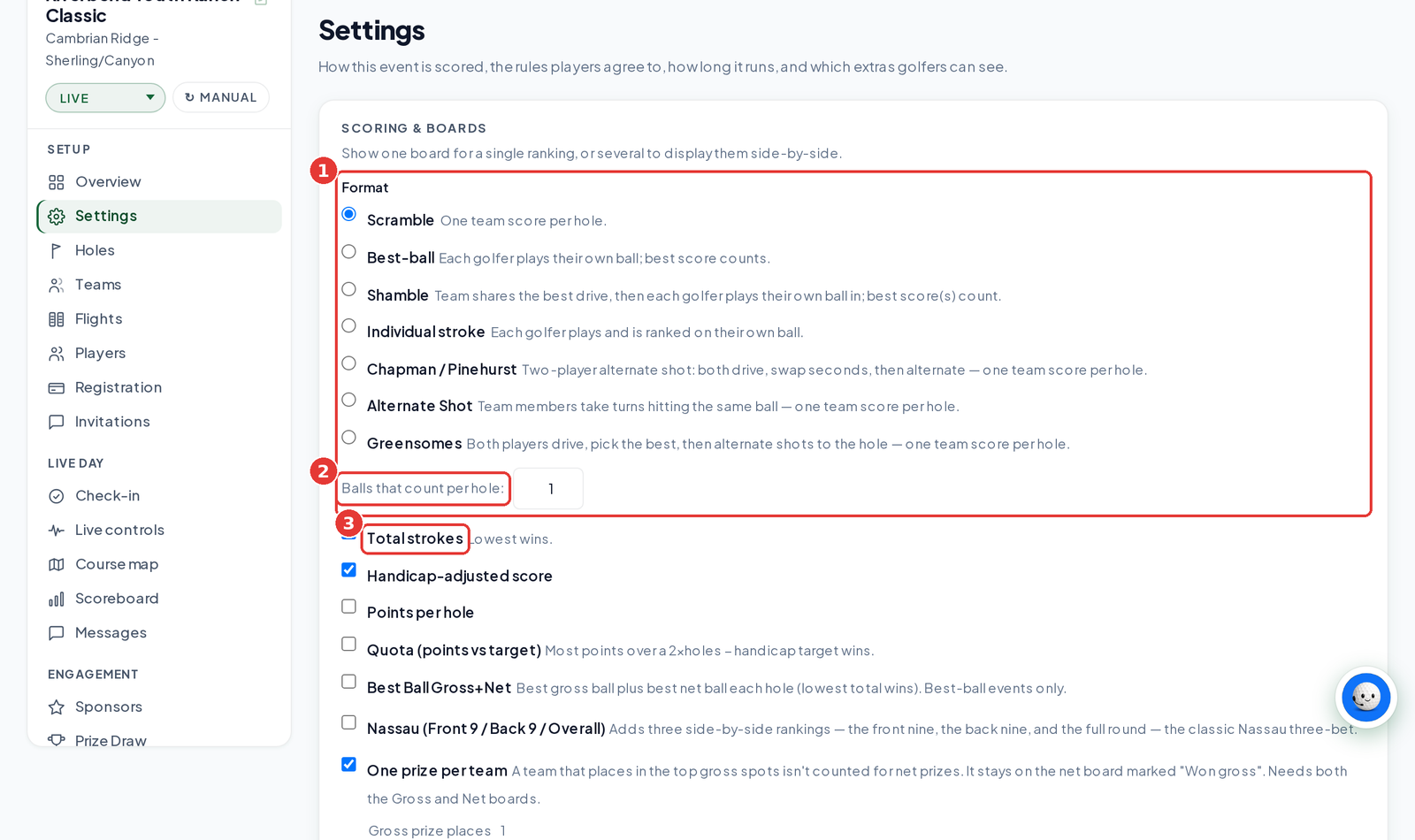
We support seven play formats: Scramble, Best-ball, Shamble, Individual stroke, Chapman / Pinehurst, Alternate Shot and Greensomes. Rank them by total strokes (Gross), Net, Stableford points or Quota, and show more than one board side by side. Pick the format when you create the event, and fine-tune it any time under Settings → Scoring & boards.
On this page
Overview
Pick how your event is played and how it's ranked.
Who this is for
Organizers choosing a format.
Play formats
| Format | How it works |
|---|---|
| Scramble | One team score per hole. Everyone hits, the team plays the best shot. |
| Best-ball | Each golfer plays their own ball. The best score (or best 2, 3 or 4) counts for the team. |
| Shamble | The team picks the best drive, then each golfer plays their own ball in. The best score(s) count. |
| Individual stroke | Each golfer plays and is ranked on their own ball. |
| Chapman / Pinehurst | Two-player alternate shot: both drive, swap for the second shot, then alternate. One team score per hole. |
| Alternate Shot | Team members take turns hitting the same ball. One team score per hole. |
| Greensomes | Both players drive, pick the best, then alternate shots to the hole. One team score per hole. |
Ranking boards
| Board | What it ranks |
|---|---|
| Total strokes (Gross) | Lowest total wins. |
| Handicap-adjusted score (Net) | Gross minus handicap strokes. Needs handicaps. |
| Points per hole (Stableford) | Most points wins. Needs par on every hole. |
| Quota (points vs target) | Most points over the target wins. Target: 2 points a hole, minus the handicap. In best-ball and shamble the target stays at 2 a hole, and each golfer's handicap counts in their own score. |
| Best Ball Gross+Net | Best gross ball plus best net ball each hole. Best-ball events only. |
Extras on the same card: Nassau (front nine, back nine and overall), One prize per team, 6-6-6 Rotating Partners, Wolf, Bingo-Bango-Bongo and a One-day handicap (Callaway or Peoria).
Set your format and boards
Open Settings
Open your event and click Settings.
Pick a Format
Under SCORING & BOARDS, choose a format. For Best-ball, set Balls that count per hole (1 to 4).
Pick your boards
Tick each board you want to show.
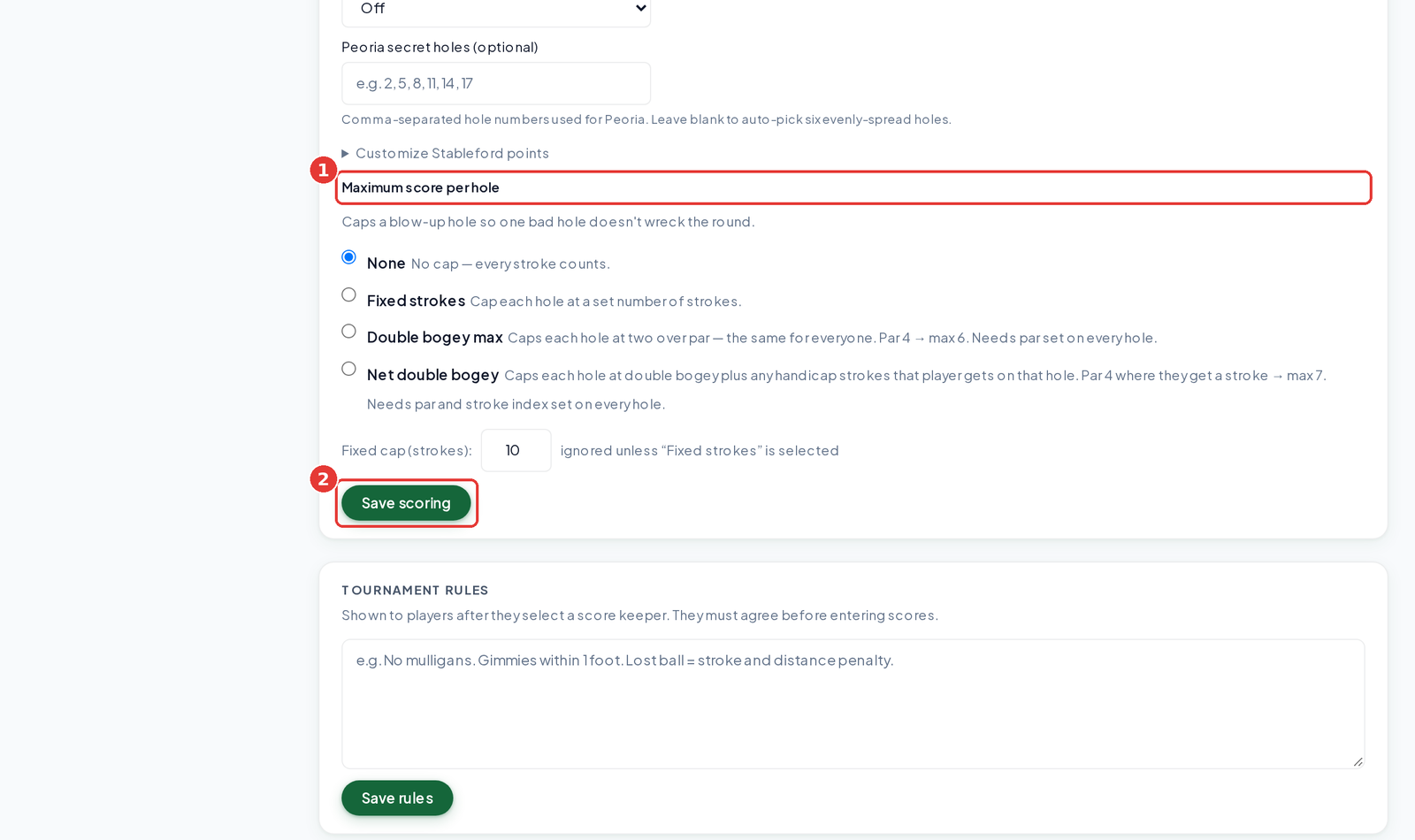
Set a Maximum score per hole (optional)
None, Fixed strokes, Double bogey max or Net double bogey.
Click Save scoring
The scoreboard updates right away.
Stableford points
Open Customize Stableford points to pick a points table: Standard (birdie 3, par 2, bogey 1), Modified: aggressive (eagle 5, birdie 2, par 0, bogey −1, double −3), or Custom with your own values.
Tips
- Charity and corporate events usually pick Scramble with Gross and Net boards.
- Net and Stableford need par set on every hole. Net double bogey also needs stroke index.
Troubleshooting
| If you see this | Try this |
|---|---|
| The Net board matches Gross | No handicaps are set. Add team handicaps on the Teams tab. |
| Stableford shows 0 points | Set par on every hole on the Holes tab. |
Frequently asked questions
Can I mix formats in one event?
No. The format applies to the whole event. Run separate events if you need two formats.
What happens if a team has no handicap?
Its net equals its gross.
Can I change the Stableford points?
Yes. Open Customize Stableford points and choose Standard, Modified or Custom.
How many balls count in Best-ball?
You choose 1 to 4 under Balls that count per hole.